
Updated October 31, 2026
Upgrades: Quick Snips, Deep Pockets and Fast Feet
Understand the three cash upgrades shown in recorded gameplay before you choose your next purchase.
Quick answer
Open the purple UPGRADES panel. Quick Snips affects cutting speed, Deep Pockets affects bag space and Fast Feet affects movement speed. Choose the next improvement for the part of the loop slowing you down.
Work through the steps
Use the current game interface when it differs from recorded gameplay.
Read the current and next values
Open UPGRADES and read its job-only warning.
- Success check
- The three upgrade cards show their current and next values.
- If it remains unclear
- Check the current panel before assuming a benefit is permanent.
Read the supporting evidence
§Read the current and next values#
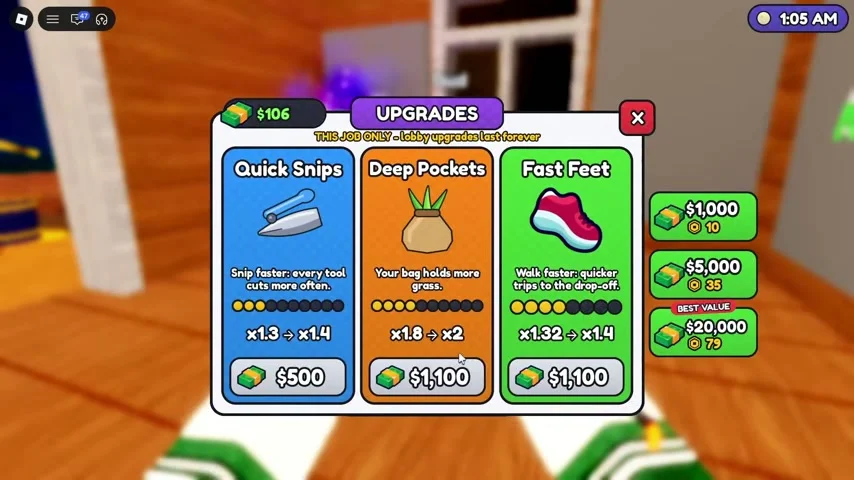
The reviewed panel presents three upgrade cards with their current and next multipliers, plus cash prices below. Use those values in your server when comparing a purchase. The footage contains later upgrade levels, so its prices are examples of a run in progress.
Quick Snips is described as snipping faster, Deep Pockets makes the bag hold more grass, and Fast Feet makes walking quicker. Cash and gems appear separately in this interface; the three card purchase buttons in the reviewed screen show cash.
The panel explicitly labels these upgrades “THIS JOB ONLY” and says lobby upgrades last forever. Treat the three cards as run-specific spending. Read the lobby upgrade descriptions separately before using a permanent currency.
Pick an upgrade by the interruption
Choose the card that addresses your current bottleneck.
- Success check
- The selected upgrade effect matches cutting, capacity or travel.
- If it remains unclear
- Compare a bag or tool purchase if it addresses the same problem.
Read the supporting evidence
§Pick an upgrade by the interruption#
Choose Quick Snips when you spend most of a trip slowly cutting a patch. Compare Deep Pockets with a bag purchase when you fill up too quickly. Consider Fast Feet when travel between the lawn, shed and DROP-OFF is taking too much of your time.
This is a practical decision rule derived from the visible effects. It does not establish a mathematically optimal purchase order. Check one improvement at a time so you can see whether it solves your current problem.
Check the result before spending again
Check the changed counter or card after buying.
- Success check
- The purchase advances a value or visibly changes the next trip.
- If it remains unclear
- Reopen the panel and inspect cash before another purchase.
Read the supporting evidence
§Check the result before spending again#
After buying a capacity improvement, compare the bag counter’s maximum. After a cutting improvement, make a short pass through a familiar patch. After a movement improvement, compare the return trip to DROP-OFF.
If the purchase does not appear to register, check whether the displayed cash changed and whether the card advanced to its next value. Reopen the panel before making another purchase. The exact handling of failed purchases is not established in the reviewed footage.
Before heading home, remember the recorded job-only warning. This guide does not promise that Quick Snips, Deep Pockets or Fast Feet levels will carry into the next job.
Scope and sources
Official details and recorded gameplay checked October 31, 2026.
- Screenshots show community gameplay. Prices, menus and objectives may change after updates. Latest official description checked October 31, 2026.